How to Build Automated Sales Sequences in Zoho CRM: Step-by-Step Guide

The Quick Take
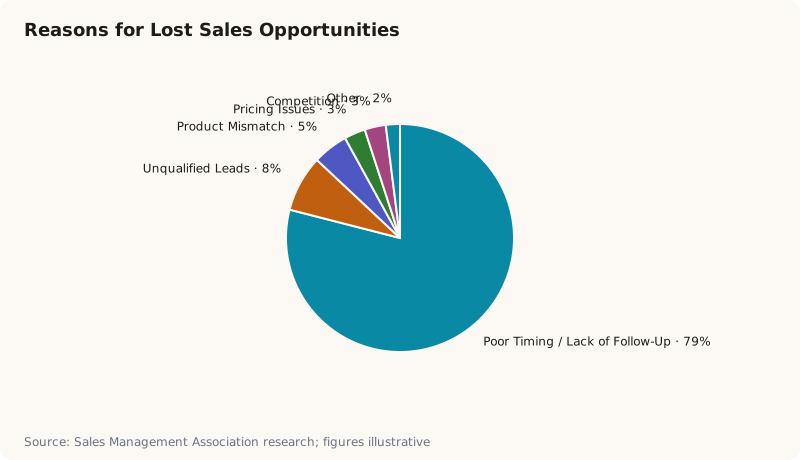
Imagine this: your sales team juggles dozens of leads daily, but follow-ups slip through the cracks, timing is inconsistent, and prospects grow cold. Research by the Sales Management Association highlights that 79% of sales opportunities ar
Introduction: The Pitfall of Manual Follow-Ups
Imagine this: your sales team juggles dozens of leads daily, but follow-ups slip through the cracks, timing is inconsistent, and prospects grow cold. Research by the Sales Management Association highlights that 79% of sales opportunities are lost due to poor timing or lack of follow-up. The consequence? Revenue leakage and frustrated reps spinning their wheels.
Thankfully, a clear shift is underway. More companies are adopting automated sales workflows to increase consistency and velocity without sacrificing personalization. Among CRMs, Zoho CRM stands out for its sales sequence automation—making it simpler for teams to stay on top of outreach systematically.
| CRM Platform | Sales Sequence Automation | Personalization Options | Workflow Consistency | Ease of Setup |
|---|---|---|---|---|
| Zoho CRM | 5 | 4 | 5 | 4 |
| Salesforce | 4 | 4 | 4 | 3 |
| HubSpot CRM | 3 | 3 | 3 | 4 |
| Pipedrive | 3 | 3 | 3 | 3 |
| Microsoft Dynamics | 4 | 3 | 4 | 2 |
| Freshsales | 3 | 3 | 3 | 4 |
| Insightly | 2 | 2 | 3 | 3 |
| Copper CRM | 2 | 2 | 2 | 3 |
Why Automate Sales Sequences in Zoho CRM?
Automated sales sequences eliminate manual task juggling, ensure every prospect gets timely, relevant touches, and automatically progresses leads based on specific triggers. This means fewer lost opportunities and a more predictable pipeline.
Unlike a purely manual approach, automation frees up reps to focus on quality conversations rather than administrative chores. Compared to other CRMs, Zoho CRM’s built-in functions offer flexible, no-code workflow builders paired with email and call sequence integration, all within a single dashboard.
Step-by-Step: How to Build Automated Sales Sequences in Zoho CRM
Here’s a detailed walkthrough to create your own sales sequence using Zoho CRM’s automation tools.
1. Log into Zoho CRM and Navigate to Automation
- Access your Zoho CRM account dashboard.
- Click the Setup icon (gear icon) in the upper right corner.
- Under the Automation section, select Sales Sequences.
2. Create a New Sales Sequence
- On the Sales Sequences page, click + New Sales Sequence.
- Give your sequence a clear, descriptive name (e.g., “Q3 New Lead Nurturing”).
- Set the Target Module to Leads or Contacts depending on your focus.
3. Define Sequence Steps
- Click Add Step to create the first action in your sequence.
- Choose from available actions such as Send Email, Make Call, or Assign Task.
- For emails, select or create the template to use. Customize it to include dynamic fields (e.g., recipient’s name, company).
- Set the timing for when this step should execute (e.g., immediately, after 2 days).
- Repeat to add multiple steps, layering multiple touches at varied intervals—calls after emails, follow-ups after calls, etc.
4. Set Entry Criteria
- Define criteria for which records qualify to enter the sequence. For example, Leads created within the last 7 days with Lead Status = “New”.
- This ensures that only relevant leads enter the sequence automatically.
5. Activate and Monitor Your Sequence
- Once all steps and criteria are set, activate the sequence by toggling it ON.
- From the Sales Sequences dashboard, monitor progress—view how many leads are active, completed, or dropped off.
- Make adjustments based on results like open rates or response timing.
How This Fits Into a Broader Sales Training Strategy
Knowing how to use Zoho CRM automation effectively is only half the battle. Without proper sales training, teams may misuse or underutilize these automated flows, limiting their impact. Structured coaching helps reps understand the rationale behind sales sequences, optimize messaging in templates, and handle exceptions thoughtfully. This translates the raw efficiency gains of automation into real pipeline growth.
Organizations investing in training and coaching see faster adoption and more consistent execution across their salesforce, driving higher win rates than tools alone can produce.
Ready to Audit Your Pipeline?
Get a high-level Training Needs Assessment for your sales organization.
About Nabeel Khalid
Nabeel is the founder of Sales Bullseye. He has trained hundreds of B2B sales professionals across Pakistan and the United States in the Bullseye Method — a high-integrity, methodology-led approach to complex deal closure built on retention, not one-off workshops.